
Helping small businesses for over 20 years

Archive for SEO

Using Tags & Categories in WordPress (Video)

This is an often-misunderstood pair of features in WordPress. Using Tags & Categories properly will help your page be indexed better by the search engines, and it will make it easier for your readers to find content on your site.

[simple_video]

Scribe SEO for WordPress

If you’re truly focused on getting your rankings up in your search engine, consider investing in Scribe for WordPress (also available for Joomla and Drupal). For a monthly fee you will get a plugin that searches and helps you optimize your posts AS YOU CREATE THEM, right there from your WP dashboard.

Find out how Scribe Makes SEO Simple

WordPress Plugins I Can’t Do Without

In my opinion, these are the top 10, “must have” plugins on any WordPress site. These are the absolute must-have plugins for any WordPress blog. They are all free, though the developers do encourage donations.

  1. Contact Form 7: Simple, but effective contact form.
    By Takayuki Miyoshi | Visit plugin site
  2. Simple CAPTCHA: A simple captcha system for comment system to prevent spam.
    By Zorex | Visit plugin site
  3. 3. All in One SEO Pack: Out-of-the-box SEO for your WordPress blog.
    By Michael Torbert | Visit plugin site
  4. 4. Akismet: Comment spam filter. Included with default installation of WordPress
    By Matt Mullenweg | Visit plugin site
  5. Sociable: Automatically add links on your posts, pages and RSS feed to your favorite social bookmarking sites.
    By Blogplay | Visit plugin site
  6. Page Link Manager: Adds admin panel to choose which pages appear in the site navigation.
    By Garrett Murphey | Visit plugin site
  7. FD Feedburner Plugin:  Redirects all feeds to a Feedburner feed
    By John Watson | Visit plugin site
  8. Google Analytics for WordPress: This plugin makes it simple to add Google Analytics with extra search engines and automatic clickout and download tracking to your WordPress blog.
    By Joost de Valk | Visit plugin site
  9. Google XML Sitemaps: This plugin will generate a sitemaps.org compatible sitemap of your WordPress blog which is supported by Ask.com, Google, MSN Search and YAHOO.
    By Arne Brachhold | Visit plugin site
  10. WordPress Database Backup: On-demand backup of your WordPress database.
    By Austin Matzko | Visit plugin site

Search Engine Optimization (SEO) Basics
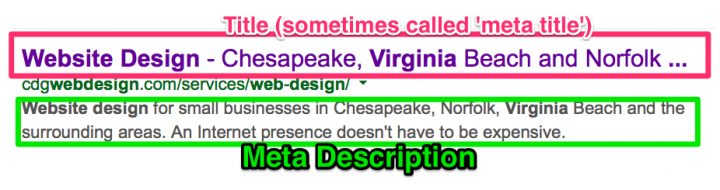
Whether your are blogging or developing another type of website, the basics to SEO remain the same:

  • Good, fresh content
  • Optimized content
    • Meta <Title> Tag containing keyword
    • Meta <Description> Tag containing keyword
    • A reasonable density of the keyword you are targeting in your content
    • Proximity of keyword to beginning of content
    • Keyword appearing in H tags and alt tags (there is dispute over this in the SEO world)
  • Quality links back to your site
    • Organic links
    • Directory links
    • Authority site links

The trick, of course, is doing all that optimization to make the search engines happy, and still having a site that looks and reads well to your human audience.

I’m not an expert at SEO, in fact I’m still a student. I’m taking an online class that came as a part of my purchase of a great software package called WebCEO. It’s fairly comprehensive and has really been great in helping me optimize my own business web site as well as some client sites. They have a FREE version, which is fully functioning; it just doesn’t have some of the advanced features that the professional version contains. Check it out when you get a chance! WebCEO

This barely scratches the surface of SEO. Entire articles can be written on just about each element I’ve mentioned, and we’ll get to that… all in good time.

Quality Links = Better Rankings

links-graphicLink building must be part of your search engine optimization (SEO) plan. Where content is king on the internet, links are queen. Links back to your site are how the search engines tell whether your content is valuable or not.

Quality Counts

While there are many products available on the internet that claim to get you a substantial number of links back to your site, the quality, or lack thereof, may actually be detrimental to your rankings. If your business is a pet store and your links are on a site about vacations in the Bahamas, the search engines consider this a “junk” link and you may actually be penalized in the rankings game.

Some of the software out there that targets other sites for linking is actually quite sophisticated and will only give you results based on specific keywords.

You want to focus on links on sites that have complementary subjects. If you specialize in accessible real estate for handicapped people, a link on a site with other resources for handicapped people is a quality link. If that site has a good page rank on the search engines, then your link is even more valuable.

Anchor Text

The anchor text is the actual words on the page that you click on. The anchor text of a link is extremely important, because it’s that text that tells the search engine what your site is about.

For example:

For great information about home staging in Norfolk, click here

Check out this valuable information about home staging in Norfolk.

In these two examples the first one appears to be a link about “click here”, not good at all! The second example is a link about specific keywords. The links should be variations of the keywords you are trying to rank for.

Ideally, the links should also be to various pages on your website and not necessarily the home page. A link to the home page is a link to your site, but a link to a sub-page is a link to your CONTENT.

Conclusion

Focus on getting backlinks to your site with consideration to the source of the link, the content of the link, and the destination of the link.

login button